
Card Management
Easily manage your spending and card security using digital banking.
- Freeze your card by temporarily blocking it. You can unblock your card at any time.
- Card controls based on multiple criteria including setting spending limits
- Set up alerts to monitor card transactions and automatically receive fraud notifications.
- Request a new card if it is damaged, lost or stolen.
- Activate a new or replacement card.
- Update your PIN, view your card number, CVV code and expiration date.
- Seamlessly add your card to Apple Pay or Google Pay.
- View your credit card reward balance and redeem your rewards
- Use your debit and credit card instantly via digital issuance. Use your card number, expiration date and CVV for your online shopping, subscription services, and load into your mobile wallet.
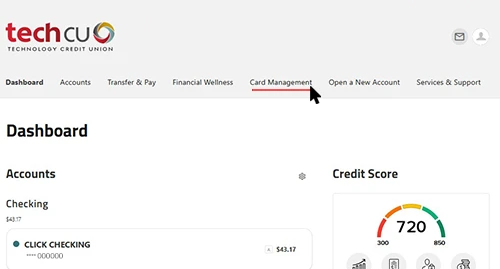
How to Access Card Management
- Log into the Tech CU App or digital banking
- Select Card Management through the More menu in the mobile app and through the main navigation in Online Banking

