
ABA/Routing Number & Electronic Transactions
To complete an electronic transfer (including domestic and international wire transfers, along with direct deposit), you'll find details below.
The Basics
To set up any new electronic transfer (including direct deposit, FedNow/RTP) either to or from your Tech CU checking or savings account, please provide the following
- Technology Credit Union's Routing Number (ABA #): 121181976
- 13-digit account number
To view your 13-digit checking, savings or money market account number using Online Banking.
- Sign in to Digital Banking
- Click checking, savings, or money market account to display “Transactions”
- Click “Account Details” and your full 13 digit account number will be displayed along with other account details
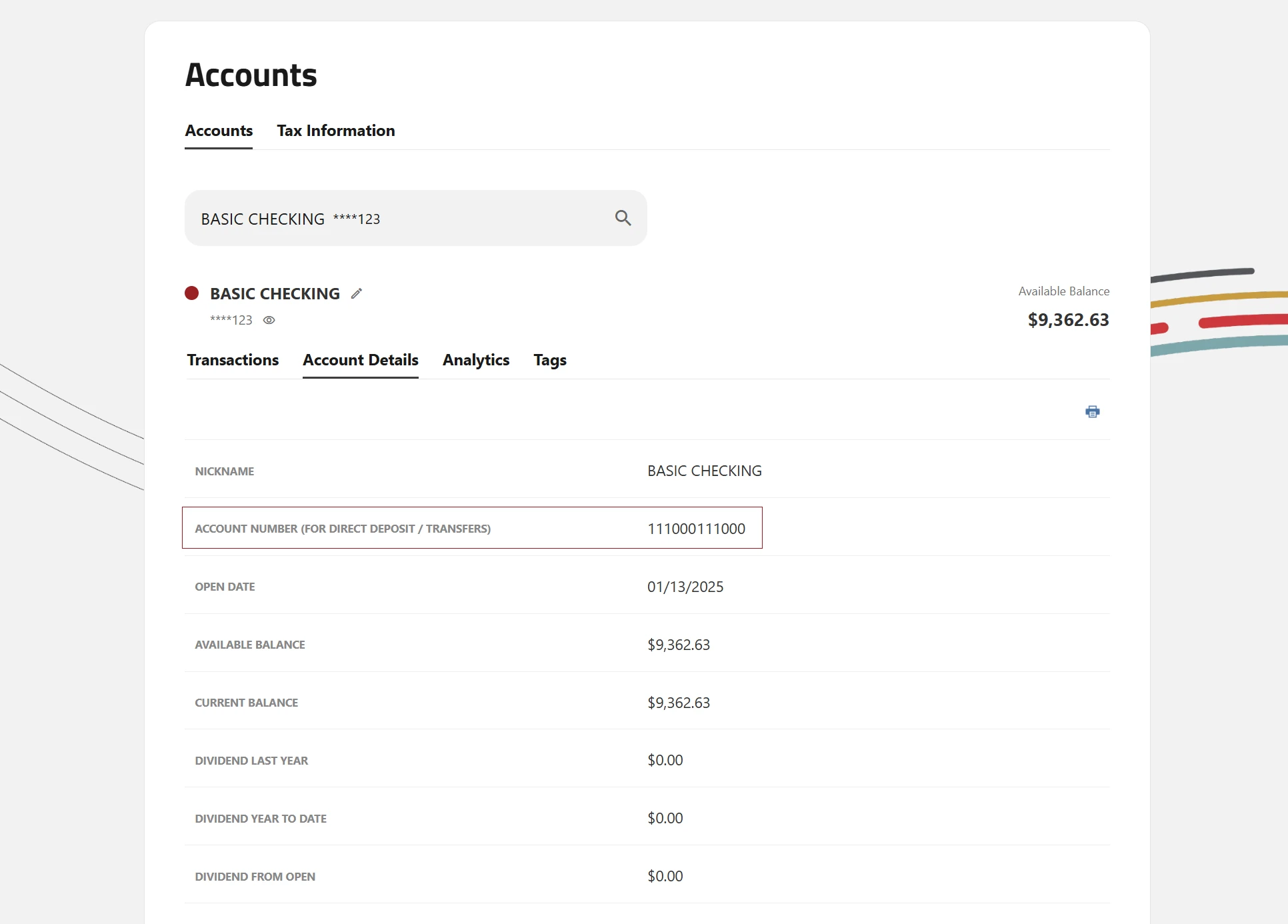
Accounts: Desktop View
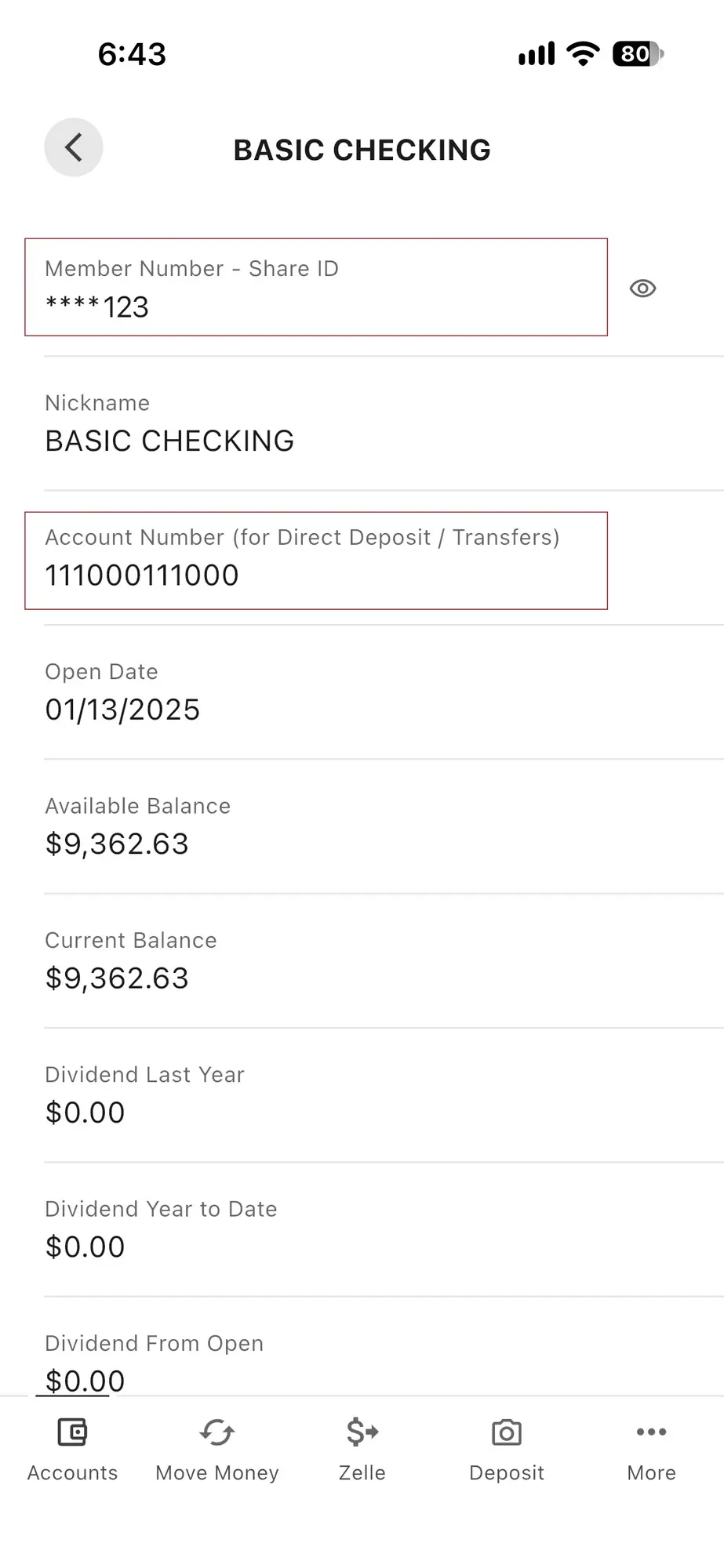
Accounts: Mobile View
Wire Transfer Instructions
To set up a domestic or international wire transfer to or from Tech CU, you will be required to provide the following information.
Domestic Wire Transfers (To Tech CU)*
To RECEIVE funds into your Tech CU account from another financial institution within the U.S., you will need to supply the initiating institution with the following information:
- Tech CU’s Address: PO Box 1409, San Jose, CA 95109
- Technology Credit Union's Routing Number (ABA #): 121181976
- 13-digit account number
Domestic Wire Transfers (From Tech CU*)
To SEND** funds online from your Tech CU account, to be deposited into another institution within the U.S., please do the following:
Log into your Online Banking account, select "Transfer & Pay" in the menu and then click the "Wires" link. To complete the transaction, you will need to supply Tech CU with the following information:
- The full name of the beneficiary and their address
- The routing or ABA number assigned to the receiving financial institution
- Account number of the beneficiary at the receiving financial institution
- Wire Purpose
International Wire Transfers (To Tech CU)*
To RECEIVE funds into your Tech CU account from another financial institution outside the U.S., you will need to supply the initiating financial institution with the following information:
- Beneficiary Name (your name)
- Beneficiary Account Number (your Tech CU account number)
- Tech CU’s SWIFT BIC Code : TECHUS6S
- Beneficiary Bank Name: Technology Credit Union, San Jose, CA US
- Beneficiary Bank Address: 2010 North First Street, San Jose, CA 95131
Note: This SWIFT BIC code was re-activated February 2, 2019. Not all international financial institutions have updated their database with the most recent SWIFT directory, however Tech CU is live with SWIFT as of this date.
International Wire Transfers (From Tech CU)*
To SEND** funds online from your Tech CU account to be deposited into another institution outside the U.S., you will need to do the following:
Log onto your Digital Banking account, select "Transfer and Pay" in the menu and then click the "Wires" link. To complete the transaction, you will need to supply Tech CU with the following information:
- The beneficiary's full name, account number and address
- The SWIFT code assigned to the receiving institution
- The name and address of the receiving financial institution
- Wire Purpose
- Any additional information required by the receiving financial institution or country to successfully complete the transaction
Tracking
Wires submitted via Online Banking can be tracked and even duplicated for future use.

